Skip to content
  • Categories
  • Recent
  • Tags
  • Popular
  • Users
  • Groups
Skins
  • Light
  • Brite
  • Cerulean
  • Cosmo
  • Flatly
  • Journal
  • Litera
  • Lumen
  • Lux
  • Materia
  • Minty
  • Morph
  • Pulse
  • Sandstone
  • Simplex
  • Sketchy
  • Spacelab
  • United
  • Yeti
  • Zephyr
  • Dark
  • Cyborg
  • Darkly
  • Quartz
  • Slate
  • Solar
  • Superhero
  • Vapor

  • Default (No Skin)
  • No Skin
Collapse

The New Coffee Room

  1. TNCR
  2. General Discussion
  3. My laptop died

My laptop died

Scheduled Pinned Locked Moved General Discussion
11 Posts 7 Posters 75 Views
  • Oldest to Newest
  • Newest to Oldest
  • Most Votes
Reply
  • Reply as topic
Log in to reply
This topic has been deleted. Only users with topic management privileges can see it.
  • 89th8 Offline
    89th8 Offline
    89th
    wrote on last edited by
    #2

    Hmmm I'd say just go with a basic chromebook, but you might need to do some tinkering: https://forum.modartt.com/viewtopic.php?id=9088

    Otherwise, you're used to MacBook, might as well get one for ~$150

    1 Reply Last reply
    • LuFins DadL Offline
      LuFins DadL Offline
      LuFins Dad
      wrote on last edited by
      #3

      Does the Chromebook have the appropriate ports for connecting?

      The Brad

      1 Reply Last reply
      • George KG Offline
        George KG Offline
        George K
        wrote on last edited by
        #4

        Needs a mic-out and a USB port.

        "Now look here, you Baltic gas passer... " - Mik, 6/14/08

        The saying, "Lite is just one damn thing after another," is a gross understatement. The damn things overlap.

        1 Reply Last reply
        • JollyJ Offline
          JollyJ Offline
          Jolly
          wrote on last edited by
          #5

          I think I'd just go with the devil I know and get the refurb.

          “Cry havoc and let slip the DOGE of war!”

          Those who cheered as J-6 American prisoners were locked in solitary for 18 months without trial, now suddenly fight tooth and nail for foreign terrorists’ "due process". — Buck Sexton

          taiwan_girlT 1 Reply Last reply
          • JollyJ Jolly

            I think I'd just go with the devil I know and get the refurb.

            taiwan_girlT Offline
            taiwan_girlT Offline
            taiwan_girl
            wrote on last edited by
            #6

            @Jolly said in My laptop died:

            I think I'd just go with the devil I know and get the refurb.

            Agree.

            1 Reply Last reply
            • George KG Offline
              George KG Offline
              George K
              wrote on last edited by
              #7

              A twist...

              Looks like the internal SSD is toast. I tried booting from an external drive and it booted fine, at least to the point where I could reinstall the OS or reformat the drive.

              However, the drive could not be formatted. Installing a new SSD into the thing is not that big of a deal - I've done it before, so that might be an option....

              "Now look here, you Baltic gas passer... " - Mik, 6/14/08

              The saying, "Lite is just one damn thing after another," is a gross understatement. The damn things overlap.

              1 Reply Last reply
              • George KG Offline
                George KG Offline
                George K
                wrote on last edited by
                #8

                Update...

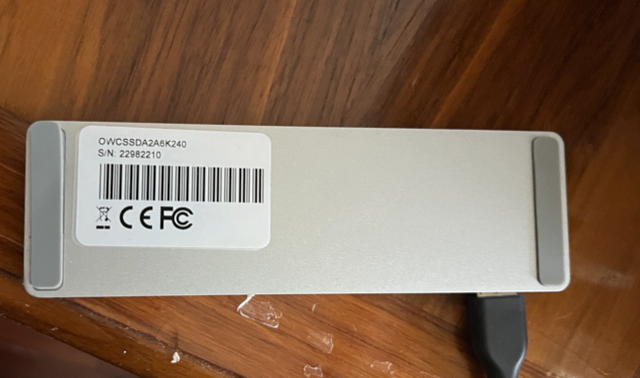
                When Mrs. George was using the computer, she was running short on space, so I purchased a 256GB module and replaced the standard 128GB module with the bigger one. The purchase included an enclosure into which I could put the original SSD. I used it as a Time Machine drive for her.

                Link to video
                Screenshot 2024-08-15 at 9.36.12 AM.png

                However, since the only function of the computer is for my Roland, there's no need for a backup, right?

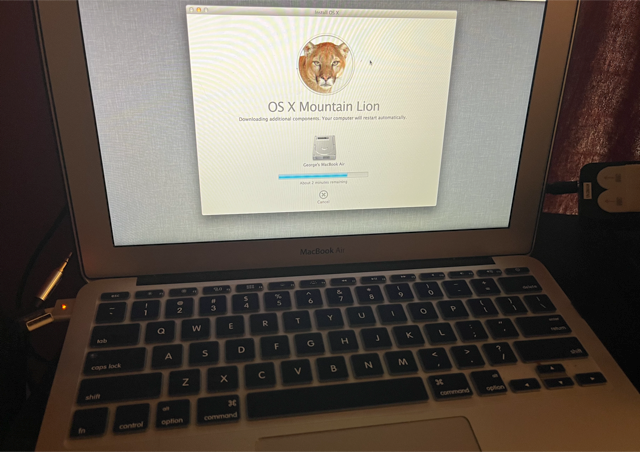
                So, this AM I pulled the SSD out of the enclosure it was in and put it into the laptop - took about 15 minutes.

                I was able to boot into "Internet Recovery Mode", erase the internal SSD and proceed.
                Screenshot 2024-08-15 at 9.36.04 AM.png

                Screenshot 2024-08-15 at 9.44.32 AM.png

                Looks like I saved some $$.

                "Now look here, you Baltic gas passer... " - Mik, 6/14/08

                The saying, "Lite is just one damn thing after another," is a gross understatement. The damn things overlap.

                taiwan_girlT 1 Reply Last reply
                • bachophileB Offline
                  bachophileB Offline
                  bachophile
                  wrote on last edited by
                  #9

                  for an old boomer you r pretty tech savvy. It would be beyond me at any level

                  1 Reply Last reply
                  • jon-nycJ Offline
                    jon-nycJ Offline
                    jon-nyc
                    wrote on last edited by
                    #10

                    It would be beyond my patience, though when it comes to my son’s gaming PC I’m not afraid to do a build.

                    Person. Woman. Man. Camera. TV.

                    1 Reply Last reply
                    • George KG George K

                      Update...

                      When Mrs. George was using the computer, she was running short on space, so I purchased a 256GB module and replaced the standard 128GB module with the bigger one. The purchase included an enclosure into which I could put the original SSD. I used it as a Time Machine drive for her.

                      Link to video

                      Screenshot 2024-08-15 at 9.36.12 AM.png

                      However, since the only function of the computer is for my Roland, there's no need for a backup, right?

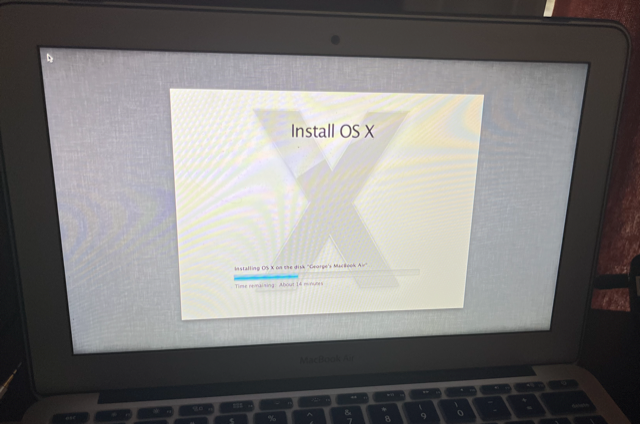
                      So, this AM I pulled the SSD out of the enclosure it was in and put it into the laptop - took about 15 minutes.

                      I was able to boot into "Internet Recovery Mode", erase the internal SSD and proceed.
                      Screenshot 2024-08-15 at 9.36.04 AM.png

                      Screenshot 2024-08-15 at 9.44.32 AM.png

                      Looks like I saved some $$.

                      taiwan_girlT Offline
                      taiwan_girlT Offline
                      taiwan_girl
                      wrote on last edited by
                      #11

                      @George-K 👍

                      1 Reply Last reply

                      Hello! It looks like you're interested in this conversation, but you don't have an account yet.

                      Getting fed up of having to scroll through the same posts each visit? When you register for an account, you'll always come back to exactly where you were before, and choose to be notified of new replies (either via email, or push notification). You'll also be able to save bookmarks and upvote posts to show your appreciation to other community members.

                      With your input, this post could be even better 💗

                      Register Login
                      Reply
                      • Reply as topic
                      Log in to reply
                      • Oldest to Newest
                      • Newest to Oldest
                      • Most Votes


                      • Login

                      • Don't have an account? Register

                      • Login or register to search.
                      • First post
                        Last post
                      0
                      • Categories
                      • Recent
                      • Tags
                      • Popular
                      • Users
                      • Groups