F'ing GoDaddy
-
George, changing email service provider while keeping the same domain name registrar by changing DNS MX record is standard practice, so chances are good that you will be fine.
Consider keeping the old Microsoft Exchange service for a while after you switch over to the new email service just to have a way to "undo" in case the new service does not work out. DNS record change sometimes may take a while to propagate throughout the Internet, so maybe give it a few days before you judge the change "doesn't work."
-
George, changing email service provider while keeping the same domain name registrar by changing DNS MX record is standard practice, so chances are good that you will be fine.
Consider keeping the old Microsoft Exchange service for a while after you switch over to the new email service just to have a way to "undo" in case the new service does not work out. DNS record change sometimes may take a while to propagate throughout the Internet, so maybe give it a few days before you judge the change "doesn't work."
@Axtremus said in F'ing GoDaddy:
George, changing email service provider while keeping the same domain name registrar by changing DNS MX record is standard practice, so chances are good that you will be fine.
Consider keeping the old Microsoft Exchange service for a while after you switch over to the new email service just to have a way to "undo" in case the new service does not work out. DNS record change sometimes may take a while to propagate throughout the Internet, so maybe give it a few days before you judge the change "doesn't work."
I was hoping you'd chime in - thank you.
Yeah, my plan is good for another week or so, so I'll keep both. I may need some help in changing the DNS MX records, but the folks at the company I'm looking at, "Bluehost," assure me that it's pretty easy.
-
Another thing...
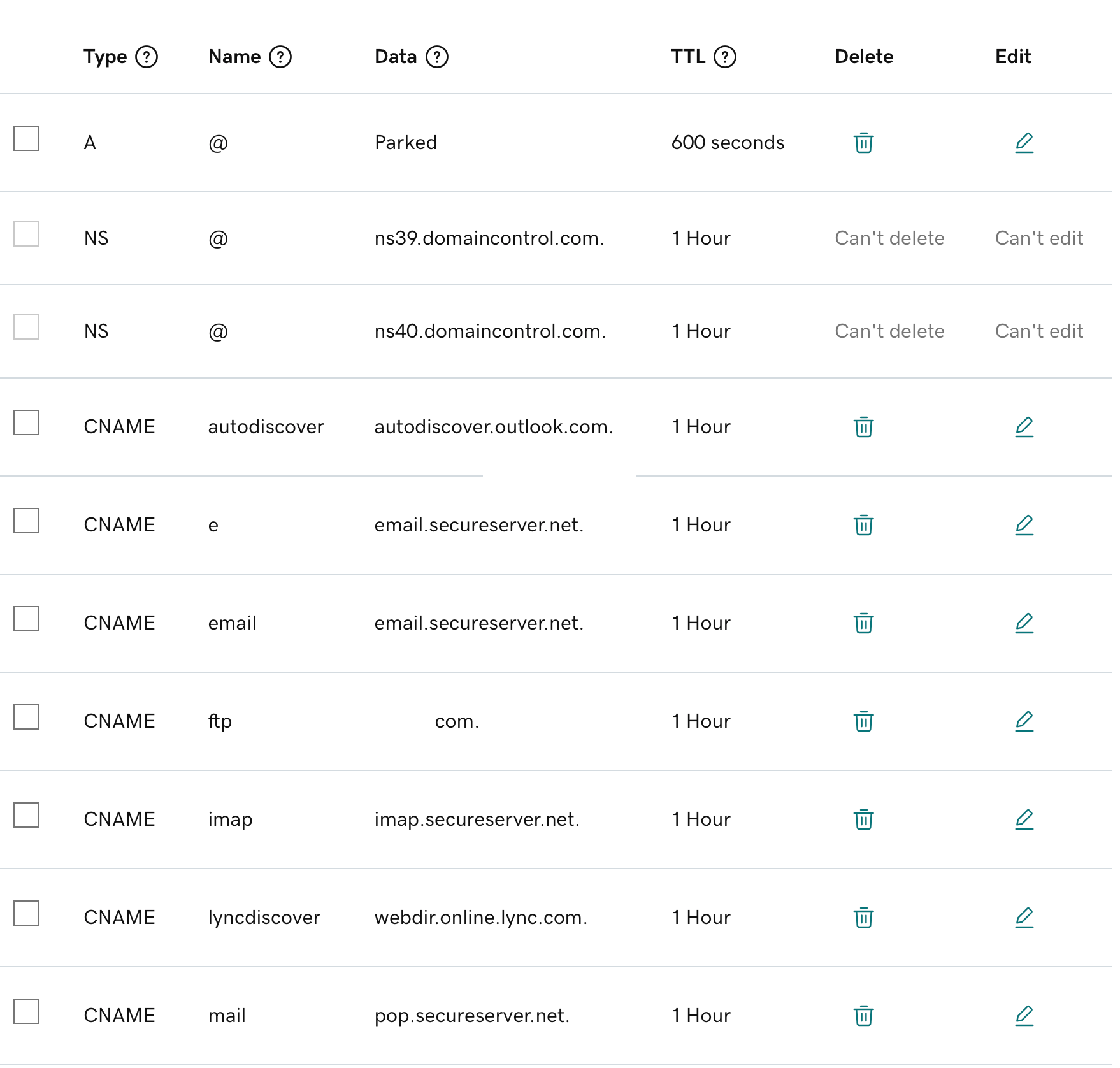
My emails are set up to direct and receive via "secureserver.net" which, I assume, is part of GoDaddy's thing. If I change the MX DNS, that wouldn't change, right?
"Now look here, you Baltic gas passer... " - Mik, 6/14/08
The saying, "Lite is just one damn thing after another," is a gross understatement. The damn things overlap.
-
Another thing...
My emails are set up to direct and receive via "secureserver.net" which, I assume, is part of GoDaddy's thing. If I change the MX DNS, that wouldn't change, right?
@George-K , about those "CNAME" entries, you don't have to worry about them if you only give out your email address in the form of yourUserName@yourDomain.com .
Some people give out email addresses like yourUserName@email.yourDomain.com or yourUserName@mail.yourDomain.com ... or they choose to login to email.yourDomain.com or mail.yourDomain.com to access their emails. In these situations you may have to worry about those CNAME entries. Otherwise you should be fine without worrying about those CNAME entries.
-
So...
Setting things up was a bit more difficult than I anticipated.
I signed up with Bluehost.com for my email.
After taking my money, there was no easy way to transition from GoDaddy/Exchange. I spent about an hour with tech support this PM changing DNS settings, etc.
They were spectacularly unhelpful - or perhaps spectacularly wrong.
After a couple of hours of not receiving or being able to send email, I contacted tech support again.
"Preena" was great. She (?) looked at my DNS settings at GoDaddy, and held my hand while I changed settings on the "A" setting, the "MX" setting etc.
No joy.
And then, she asked me to look at various CNAME settings. I deleted a bunch of them and now, it looks like I'm able to receive mails from my domain.
I've yet to try sending, but I think it'll be OK.
Yeah, a hassle, but not hard.
"Now look here, you Baltic gas passer... " - Mik, 6/14/08
The saying, "Lite is just one damn thing after another," is a gross understatement. The damn things overlap.
-
So...
Setting things up was a bit more difficult than I anticipated.
I signed up with Bluehost.com for my email.
After taking my money, there was no easy way to transition from GoDaddy/Exchange. I spent about an hour with tech support this PM changing DNS settings, etc.
They were spectacularly unhelpful - or perhaps spectacularly wrong.
After a couple of hours of not receiving or being able to send email, I contacted tech support again.
"Preena" was great. She (?) looked at my DNS settings at GoDaddy, and held my hand while I changed settings on the "A" setting, the "MX" setting etc.
No joy.
And then, she asked me to look at various CNAME settings. I deleted a bunch of them and now, it looks like I'm able to receive mails from my domain.
I've yet to try sending, but I think it'll be OK.
Yeah, a hassle, but not hard.
@George-K Have you been able to send emails? I recall jumping through similiar hoops a few years ago when I used a GoDaddy domain but switched email over to Zoho or another email provider. Indeed it took a little messing with the DNS records (cname, a, etc...) but eventually it worked. Yes I believe the secureserver.net is a godaddy thing.
I wish Danica Patrick would chime in here with some support. Any type of support. ANY.
-
Yeah, the secureserver was a GoDaddy thing. Got rid of those and all was fine.
Until mails sent to gmail accounts started bouncing back.
Had to change some DNS settings again at GoDaddy. All appears to be fine now.
The question is ... what to do with all my old emails that are sitting on a MS Exchange server. Should I try to transfer them to Bluehost, or download them to my computer.
"Now look here, you Baltic gas passer... " - Mik, 6/14/08
The saying, "Lite is just one damn thing after another," is a gross understatement. The damn things overlap.
-
Yeah, the secureserver was a GoDaddy thing. Got rid of those and all was fine.
Until mails sent to gmail accounts started bouncing back.
Had to change some DNS settings again at GoDaddy. All appears to be fine now.
The question is ... what to do with all my old emails that are sitting on a MS Exchange server. Should I try to transfer them to Bluehost, or download them to my computer.
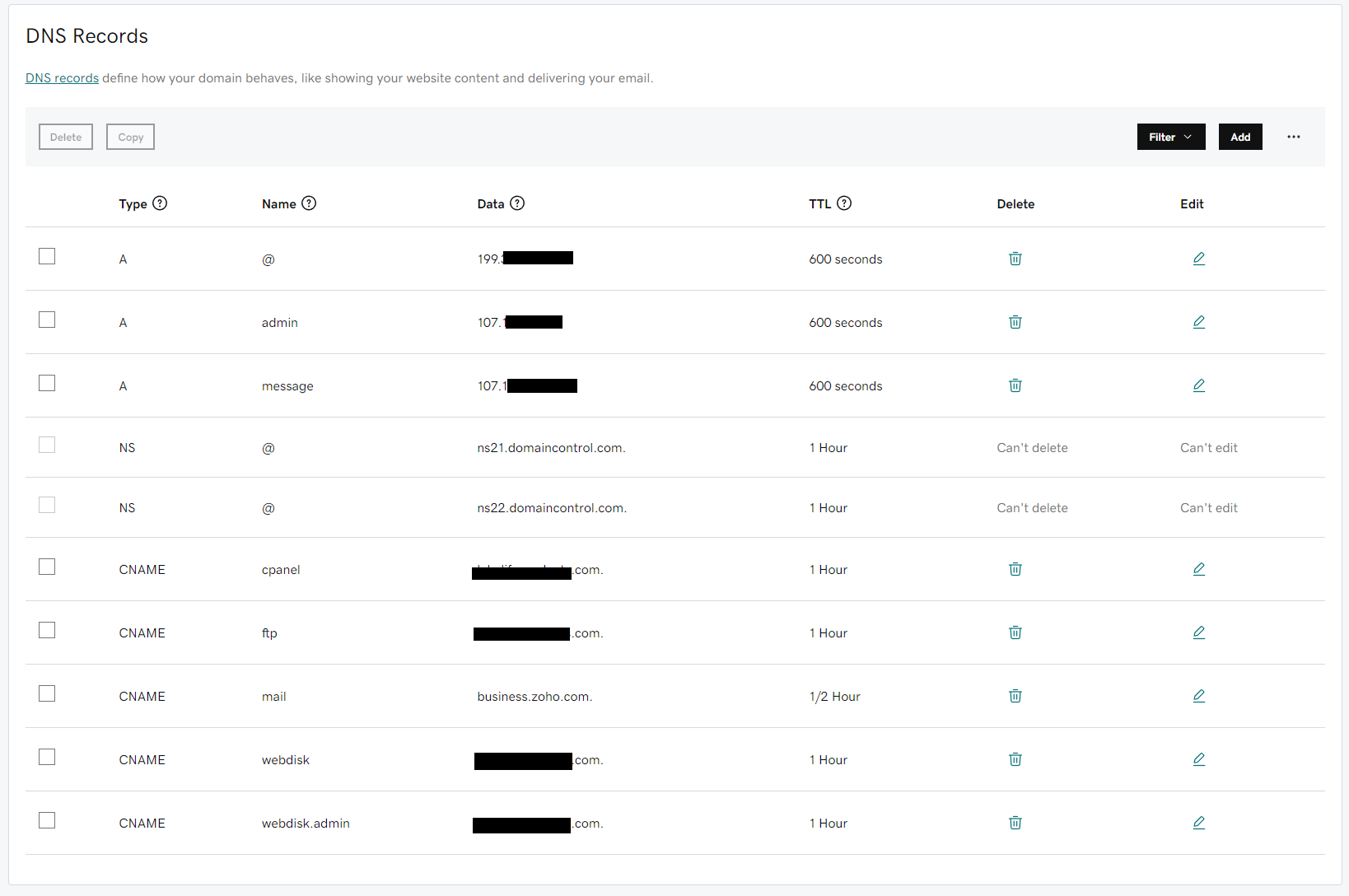
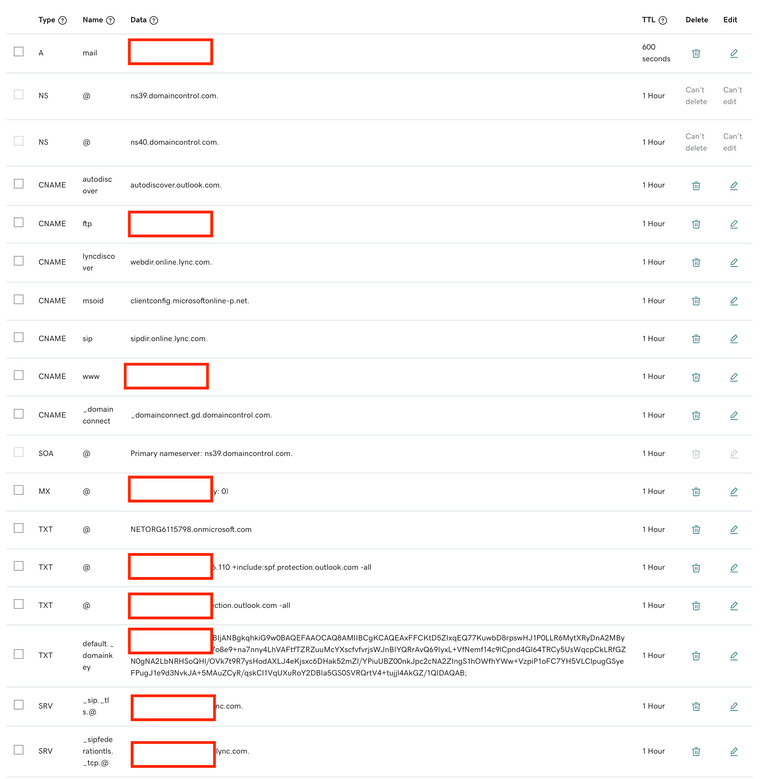
@George-K , mind posting another screenshot showing your DNS entries on GoDaddy? Feel free to mask your domain name, of course, just leave the host name portions. Curious to see what CNAME entries you have to preserve/remove/change to make email work with a different provider. Thanks.
-
Yeah, the secureserver was a GoDaddy thing. Got rid of those and all was fine.
Until mails sent to gmail accounts started bouncing back.
Had to change some DNS settings again at GoDaddy. All appears to be fine now.
The question is ... what to do with all my old emails that are sitting on a MS Exchange server. Should I try to transfer them to Bluehost, or download them to my computer.
@George-K said in F'ing GoDaddy:
The question is ... what to do with all my old emails that are sitting on a MS Exchange server. Should I try to transfer them to Bluehost, or download them to my computer.
Depends if you need them? I would download to computer/cloud for archiving.
-
I have no idea what any of those things do. Is there a location where I can learn about that?
You're welcome!
-
I have no idea what any of those things do. Is there a location where I can learn about that?
You're welcome!
-
@George-K Have you been able to send emails? I recall jumping through similiar hoops a few years ago when I used a GoDaddy domain but switched email over to Zoho or another email provider. Indeed it took a little messing with the DNS records (cname, a, etc...) but eventually it worked. Yes I believe the secureserver.net is a godaddy thing.
I wish Danica Patrick would chime in here with some support. Any type of support. ANY.







Hello! It looks like you're interested in this conversation, but you don't have an account yet.
Getting fed up of having to scroll through the same posts each visit? When you register for an account, you'll always come back to exactly where you were before, and choose to be notified of new replies (either via email, or push notification). You'll also be able to save bookmarks and upvote posts to show your appreciation to other community members.
With your input, this post could be even better 💗
Register Login