Skip to content
  • Categories
  • Recent
  • Tags
  • Popular
  • Users
  • Groups
Skins
  • Light
  • Brite
  • Cerulean
  • Cosmo
  • Flatly
  • Journal
  • Litera
  • Lumen
  • Lux
  • Materia
  • Minty
  • Morph
  • Pulse
  • Sandstone
  • Simplex
  • Sketchy
  • Spacelab
  • United
  • Yeti
  • Zephyr
  • Dark
  • Cyborg
  • Darkly
  • Quartz
  • Slate
  • Solar
  • Superhero
  • Vapor

  • Default (No Skin)
  • No Skin
Collapse

The New Coffee Room

  1. TNCR
  2. General Discussion
  3. Changing fonts?

Changing fonts?

Scheduled Pinned Locked Moved General Discussion
4 Posts 4 Posters 379 Views
  • Oldest to Newest
  • Newest to Oldest
  • Most Votes
Reply
  • Reply as topic
Log in to reply
This topic has been deleted. Only users with topic management privileges can see it.
  • George KG Offline
    George KG Offline
    George K
    wrote on last edited by
    #1

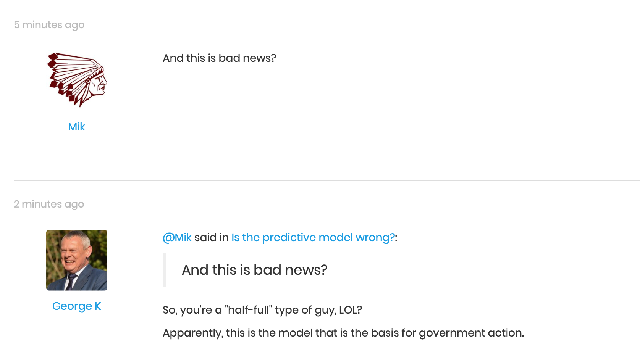
    Klaus, is there a way to change the font in quoted and posted text?

    Looking at this screenshot you see that there's quite a discrepancy.

    alt text

    "Now look here, you Baltic gas passer... " - Mik, 6/14/08

    The saying, "Lite is just one damn thing after another," is a gross understatement. The damn things overlap.

    1 Reply Last reply
    • KlausK Offline
      KlausK Offline
      Klaus
      wrote on last edited by
      #2

      Yes.

      We have several options.

      • changing the overall "theme" - it also defines font sizes. Maybe another theme is better overall?
      • hacking the current theme - not super-complicated, but things get a little ugly when there are updates of themes
      • use the "Custom CSS" option of the forum configuration. This is the cleanest way to do it. But I'm not really an expert on CSS. Maybe @mark or @Axtremus know more about this?
      1 Reply Last reply
      • AxtremusA Offline
        AxtremusA Offline
        Axtremus
        wrote on last edited by
        #3

        Looks like we have a backlog of things to look at. 🙂
        I'll start with the "security warning" first
        then may be the font size/CSS issue after that

        1 Reply Last reply
        • markM Offline
          markM Offline
          mark
          wrote on last edited by
          #4

          I have not been able to login to the admin functions. so I can see anything as far as configuration or settings. I mainly know OS/server admin, ,ssl certs and the like, and have limited experience with web design and programming but it is not my main discipline, I used to do all sorts of forum mods in the past. Like you said, they are a pain when updates are released.

          But I can't do anything until I have access.
          1 Reply Last reply

          Hello! It looks like you're interested in this conversation, but you don't have an account yet.

          Getting fed up of having to scroll through the same posts each visit? When you register for an account, you'll always come back to exactly where you were before, and choose to be notified of new replies (either via email, or push notification). You'll also be able to save bookmarks and upvote posts to show your appreciation to other community members.

          With your input, this post could be even better 💗

          Register Login
          Reply
          • Reply as topic
          Log in to reply
          • Oldest to Newest
          • Newest to Oldest
          • Most Votes


          • Login

          • Don't have an account? Register

          • Login or register to search.
          • First post
            Last post
          0
          • Categories
          • Recent
          • Tags
          • Popular
          • Users
          • Groups